Follower Management
FeatsClub gives you a complete set of tools to manage the people who follow your organization. Whether someone discovers your org through the app and taps "Follow," or you invite community members directly, the Follower Management module lets you view, organize, and engage with everyone connected to your organization -- all from your dashboard.
What Is a Follower?
A follower in FeatsClub is any person who has established a connection with your organization. Following is the foundational relationship between a user and an org -- it is how people express interest, stay informed, and become part of your community. Once someone follows your organization, they appear in your follower list where you can manage their role, track their activity, and communicate with them.
For example:
- A parent discovers your dance academy and follows to stay updated on upcoming events
- A student joins your coding club and automatically follows the organization
- You invite a guest instructor to follow your org so they can access schedules and rosters
- An alumni member stays connected after graduating from your program
Followers, Members, and Alumni
It is important to understand the distinction between these three concepts:
| Concept | What It Means | Typical Example |
|---|---|---|
| Follower | Anyone connected to your organization | A parent who follows your school to see announcements |
| Member | An active participant in your programs | A student enrolled in a basketball club |
| Alumni | A past member who is no longer actively participating | A graduated student who stays connected |
A single person can be a follower of your organization while also being a member of one or more clubs or cohorts. The follower record is the umbrella relationship -- it tracks the person's overall connection to your org, while membership in specific clubs or cohorts is tracked separately.
Community Roles
Every follower in your organization is assigned a community role that defines their level of access and responsibility. Roles form a hierarchy from basic followers to full administrators:
| Role | Description | Typical Use |
|---|---|---|
| FOLLOWER | Basic connection to the organization. Can view public content and receive updates. | Parents, supporters, casual followers |
| MEMBER | Active participant in the organization's programs and activities. | Students, athletes, enrolled participants |
| COACH | Instructor or group leader. Can manage sessions and interact with members in their groups. | Teachers, trainers, team captains |
| ADMIN | Delegated administrator with elevated permissions to manage organization operations. | Assistant directors, office managers, department heads |
| ALUMNI | Past member who maintains a connection to the organization. Recognized for their history. | Graduated students, former team members |
Community roles are independent of club or cohort membership. A person can be a COACH in your organization while also being a member of a specific club. The community role applies at the organization level.
Role Hierarchy
The roles form a progression that reflects increasing involvement and responsibility:
FOLLOWER → MEMBER → COACH → ADMIN
                                ↓
                             ALUMNI (past members)
- FOLLOWER is the default role when someone first follows your organization
- You can promote a follower to MEMBER when they join a program
- COACH and ADMIN roles are assigned by organization owners to grant additional capabilities
- ALUMNI is a special designation for past members, preserving their history with your org
How Following Works
From the User's Perspective
Users discover your organization through the FeatsClub app and can follow in several ways:
- Follow the organization -- The user taps "Follow" on your organization's profile page. This creates a connection at the org level.
- Follow a specific club or cohort -- The user follows a particular program within your organization, such as a "Junior Basketball" club.
- Follow both -- A user can follow your organization overall and also follow specific clubs or cohorts within it.
From the Admin's Perspective
When someone follows your organization, here is what happens:
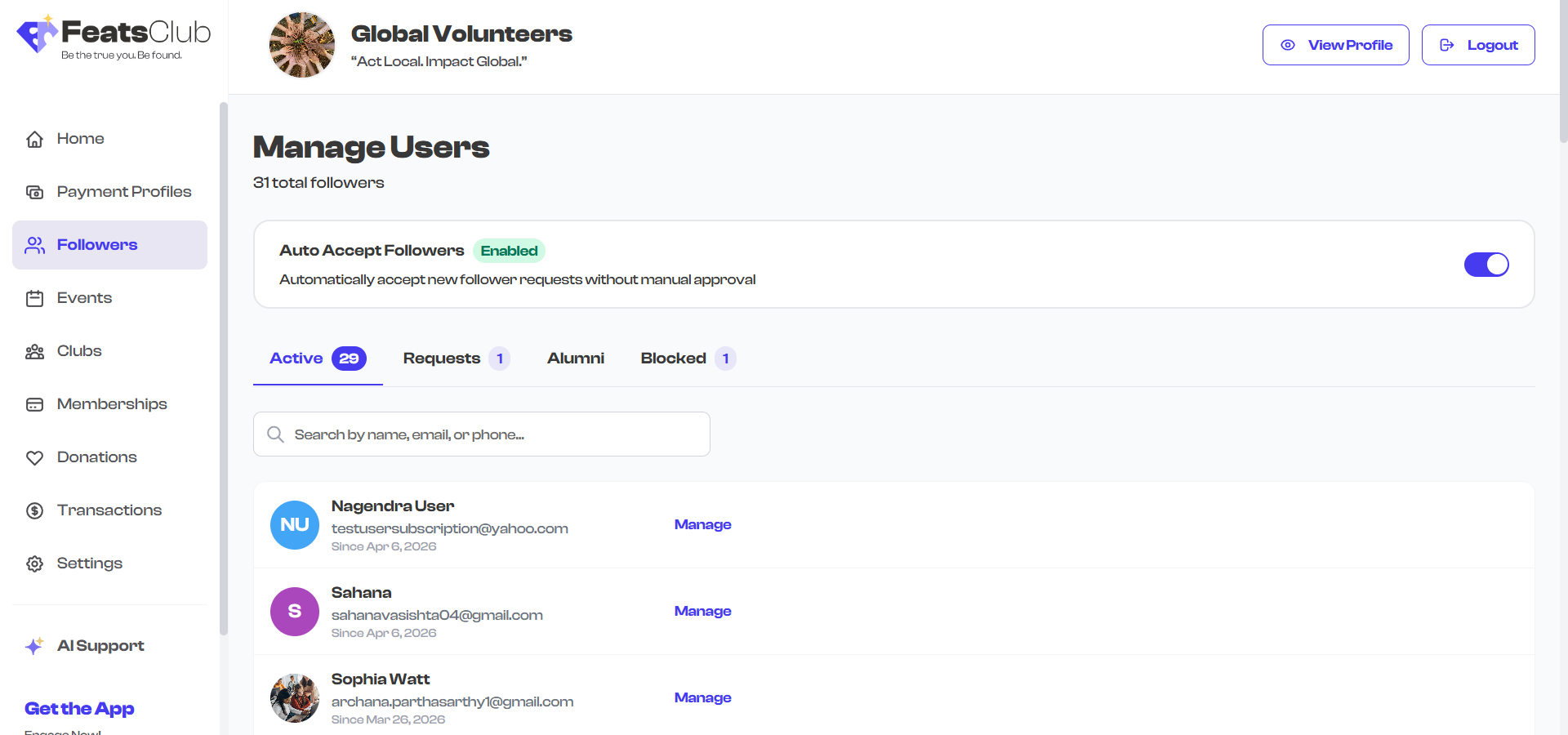
- Auto-accept enabled -- If you have turned on the auto-accept setting for your organization, the follow request is automatically approved and the person appears in your Active followers list immediately.
- Auto-accept disabled -- The follow request lands in your Requests tab, where you can review the person's profile and choose to accept or reject the request.
For organizations that want to grow their community quickly -- such as public events or open enrollment programs -- enabling auto-accept removes friction and lets people connect instantly. For organizations that need to vet members -- such as private schools or selective programs -- keeping auto-accept off gives you full control over who joins.
Follow Modes
FeatsClub tracks how a person is following your organization through the follow mode:
| Follow Mode | What It Means |
|---|---|
| Org | The person is following your organization as a whole |
| Cohort | The person is following a specific cohort or program |
| Club | The person is following a specific club |
A single person can have multiple follow relationships -- for example, following the organization overall (Org mode) and also following a specific club (Club mode). Each relationship is tracked as a separate follower record with its own status and activity history.
Key Capabilities
The Follower Management module provides several tools for managing your community:
- View and search followers -- See everyone connected to your organization with search by name
- Filter by status -- Switch between Active, Requests, Alumni, and Blocked tabs to see relevant groups
- Accept or reject requests -- Review pending follow requests and decide who joins your community
- Assign community roles -- Promote followers to Member, Coach, or Admin roles as needed
- Delegate admin permissions -- Grant specific administrative capabilities to trusted team members
- Track activity -- View each follower's activity logs and engagement history
- Manage alumni -- Maintain connections with past members and recognize their contributions
- Block followers -- Remove and block individuals who are no longer welcome in your community
In This Guide
Explore the sections below to learn everything about managing followers in FeatsClub:
- Follower Dashboard -- Navigate and understand your follower dashboard, including stats, tabs, and search
- Follower Details -- View individual follower profiles, activity logs, and contact information
- Managing Followers -- Accept requests, assign roles, block or remove followers
- Admin Delegation -- Grant administrative permissions to trusted community members
- Tips & Best Practices -- Get the most out of your follower management workflow
What's Next?
Head to the Follower Dashboard section to learn how to navigate and use your follower management dashboard.