Follower Details
The follower detail page gives you a complete view of an individual follower -- their profile information, current status, community role, and a full history of every action taken on their account. From this page you can also take direct actions such as approving, blocking, or promoting a follower to an admin role.
Navigating to a Follower's Detail Page
To open a follower's detail page:
- Go to the Followers section from your dashboard sidebar.
- Locate the follower you want to view using the status filters or search.
- Select the follower's card to open their detail page.
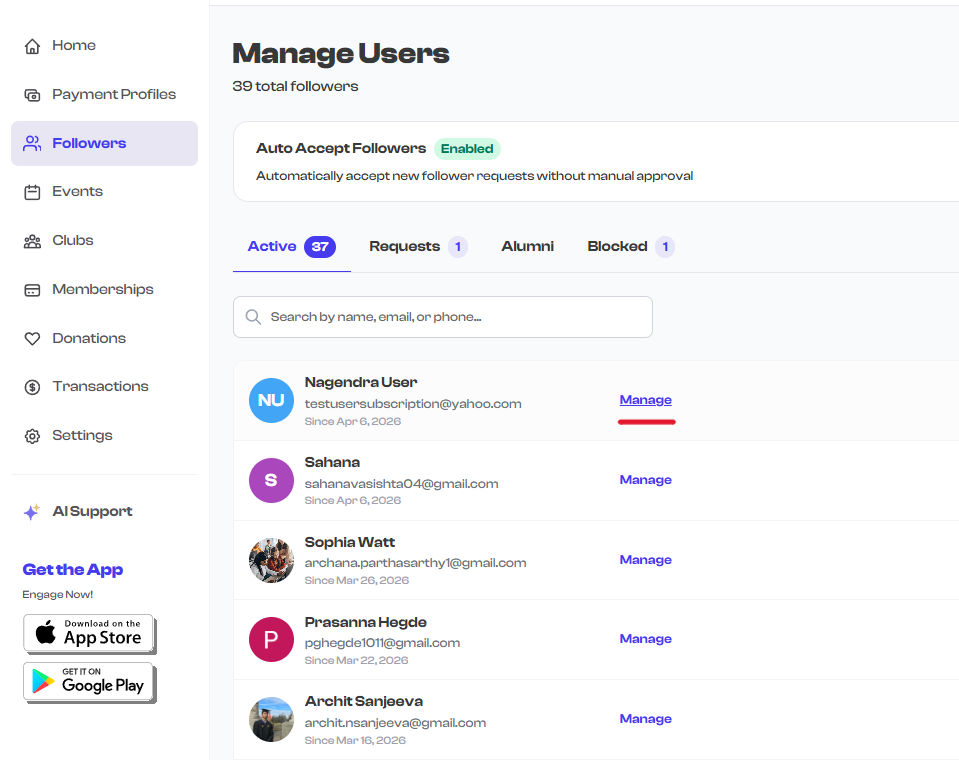
What You'll Find on the Detail Page
The follower detail page is organized into several key areas:
| Section | What It Shows |
|---|---|
| Profile Header | Photo, name, status badge, and community role badge |
| Contact Information | Email address, phone number, and physical address |
| Follow Details | How the follower joined (Org, Club, or Cohort) and their current follow mode |
| Action Buttons | Context-sensitive actions based on the follower's current status |
| Activity Log | Chronological timeline of all status changes and actions taken |
| Permissions Panel | Admin delegation controls (visible when the follower has an ADMIN role) |
info
The actions available on the detail page change depending on the follower's current status. For example, you can approve or reject a pending request, but you can only block or mark as alumni an already accepted follower.
In This Section
| Guide | What You'll Learn |
|---|---|
| Viewing Follower Details | Understand the profile layout, contact information, and activity log |
| Follower Actions | Learn about every action you can take and when each one is available |
What's Next?
- Need to manage permissions for a trusted follower? See Admin Delegation to learn how to grant specific management permissions.
- Looking for bulk management? Return to the Follower Dashboard for filtering, searching, and managing followers at scale.