Understanding Term Types
Every membership term in FeatsClub uses one of three enrollment types that determine how membership validity dates are calculated. Choosing the right enrollment type is one of the most important decisions you make when setting up a membership, because it affects when members gain access, when they lose it, and how renewals work.
This guide explains each type in detail so you can choose the one that fits your organization.
Fixed Date Terms
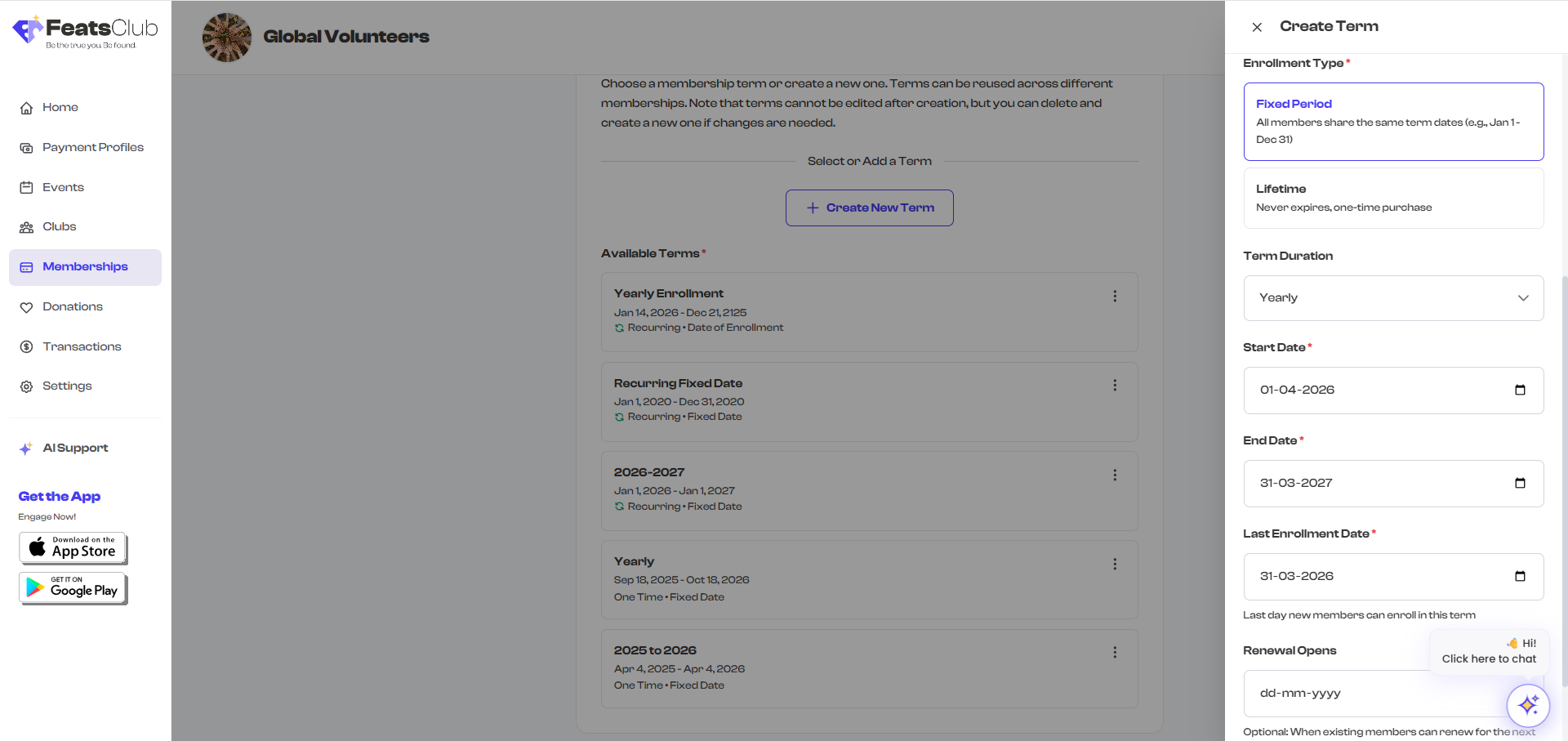
A Fixed Date term means your organization sets specific start and end dates, and all members share the same membership period regardless of when they enroll.
How It Works
- You define a start date and an end date for the term.
- Every member who enrolls gets access from the start date through the end date.
- If a member signs up halfway through the term, their membership still ends on the same date as everyone else's.
- You also set a last enrollment date -- the final day someone can sign up for this term.
When to Use Fixed Date Terms
Fixed Date terms work best when your organization runs on a defined schedule:
- Seasonal programs -- A swim club's summer season running June 1 through August 31
- Academic years -- A school's enrollment period from September 1 through May 31
- Annual memberships with a set calendar -- A community center's membership year from January 1 through December 31
- Short-term programs -- A 12-week dance intensive with specific start and end dates
Example
A youth basketball academy creates a "Fall 2025 Season" membership:
- Start Date: September 1, 2025
- End Date: December 15, 2025
- Last Enrollment Date: September 30, 2025
A parent who signs up on September 1 and another who signs up on September 28 both have memberships that expire on December 15, 2025. After September 30, no new members can enroll in this term.
What Happens When the Term Ends
When the end date passes, all members enrolled in this term have their membership status change from Active to Expired. If you have a new term ready (for example, "Spring 2026 Season"), members can re-enroll in the new term.
For Fixed Date terms with recurring payments, the end date is auto-calculated based on the term duration (monthly or yearly from the start date), and members are automatically charged for the next period.
Fixed Date terms support an optional Renewal Opens date. This is the date when existing members can start renewing for the next period. Use this to give current members a head start on re-enrollment before opening it to the public.
Date of Enrollment Terms
A Date of Enrollment term means each member's membership period starts from the day they sign up, not from a fixed calendar date. The duration is determined by the term type you set (monthly or yearly).
How It Works
- You choose a term duration -- monthly or yearly.
- When a member signs up, their membership starts immediately.
- The membership runs for the specified duration from their individual enrollment date.
- If configured with recurring payments, the membership automatically renews at the end of each period.
When to Use Date of Enrollment Terms
Date of Enrollment terms are ideal for rolling, ongoing memberships where people join at any time:
- Gym memberships -- Members join whenever they are ready and pay monthly
- Monthly subscriptions -- A yoga studio's unlimited monthly pass
- Rolling annual memberships -- A professional association where membership runs for 12 months from the date someone joins
- Online access plans -- A learning platform where members get 1 year of access from sign-up
Example
A fitness studio offers a "Monthly Unlimited" membership with a Date of Enrollment term:
- Term Duration: Monthly
- Payment Type: Recurring
Member A signs up on March 15. Their membership runs March 15 to April 15 and automatically renews on April 15. Member B signs up on March 22. Their membership runs March 22 to April 22 and automatically renews on April 22. Each member has their own independent billing cycle.

Auto-Renewal Behavior
When a Date of Enrollment term is set to Recurring payments:
- The member's payment method is charged automatically at the end of each period.
- If the charge succeeds, the membership renews seamlessly -- no action required from the member.
- If the charge fails, the membership enters a grace period (if configured) before changing to Lapsed status.
- Members can cancel their subscription at any time.
What Happens at Expiry Without Auto-Renewal
If you configure a Date of Enrollment term with One-time payment instead of Recurring:
- The member pays once at enrollment.
- The membership runs for the specified duration (one month or one year).
- When the period ends, the membership expires automatically.
- The member would need to manually re-enroll and pay again.
Date of Enrollment terms are only available when the payment type is set to Recurring. If you want a rolling start date with a one-time payment, consider using a Fixed Date term with a flexible enrollment window instead.
Lifetime Terms
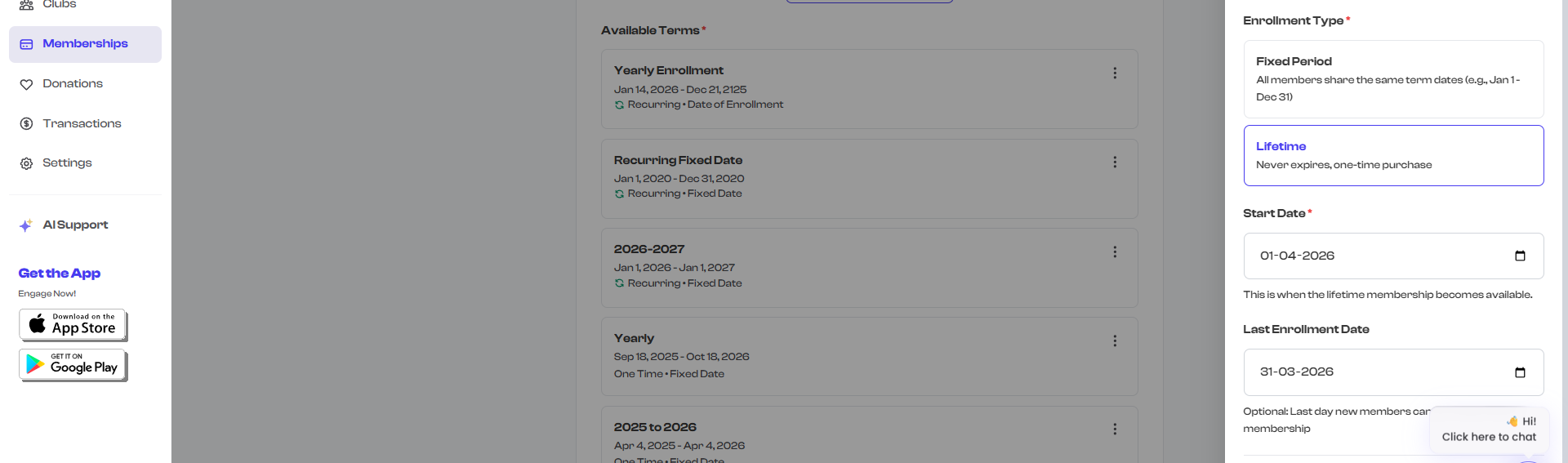
A Lifetime term means the membership never expires. The member pays once and has access indefinitely.
How It Works
- The member makes a single one-time payment at enrollment.
- There is no end date -- the membership remains valid forever.
- No renewal is needed or expected.
- You can optionally set a last enrollment date to limit when new members can purchase the lifetime membership.
When to Use Lifetime Terms
Lifetime terms work well for exclusive or one-time offerings:
- Founding member programs -- Reward early supporters with permanent access
- Alumni associations -- One-time fee for lifelong membership after graduation
- One-time certifications -- A membership that verifies a completed program
- Legacy or honorary memberships -- Permanent recognition for significant contributors
- Small club lifetime passes -- A local club offering lifetime access at a premium price
Example
A community arts center launches a "Lifetime Patron" membership:
- Enrollment Type: Lifetime
- Payment Type: One-time
- Price: $500
- Last Enrollment Date: December 31, 2025 (optional -- limits the offer window)
A supporter pays $500 and becomes a lifetime patron. Their membership never expires, and they never need to renew. The arts center can close enrollment after December 31, 2025, by setting the last enrollment date.
Important Notes About Lifetime Terms
- Lifetime terms cannot be configured with auto-renewal -- since there is no expiry, there is nothing to renew.
- The start date for a Lifetime term indicates when the membership becomes available for purchase, not when it starts for the member.
- Lifetime memberships are a strong value proposition for members, but make sure the pricing reflects the permanent nature of the access you are granting.
Lifetime memberships are a great way to generate upfront revenue and build a loyal base of long-term supporters. Consider offering them as a limited-time promotion to create urgency -- use the Last Enrollment Date to set a deadline.
Comparison Table
Here is a side-by-side comparison of all three term types to help you decide which one fits your needs:
| Feature | Fixed Date | Date of Enrollment | Lifetime |
|---|---|---|---|
| Start Date | Set by organization (same for all members) | Individual (starts when member enrolls) | When membership becomes available |
| End Date | Set by organization (same for all members) | Calculated from enrollment date | None (never expires) |
| Duration | Defined by start and end dates | Monthly or Yearly | Indefinite |
| Payment Type | One-time or Recurring | Recurring only | One-time only |
| Auto-Renewal | Available with Recurring payment | Available with Recurring payment | Not available |
| Last Enrollment Date | Required | Not applicable | Optional |
| Grace Period | Available with Recurring payment | Available with Recurring payment | Not applicable |
| Renewal Opens Date | Optional | Not applicable | Not applicable |
| Best For | Seasonal programs, academic years, calendar-based memberships | Gym memberships, monthly subscriptions, rolling annual plans | Founding members, alumni, one-time certifications |
Choosing the Right Term Type
Use this quick decision guide:
-
Does your membership follow a set calendar? (e.g., school year, season, Jan-Dec)
- Yes -- Use Fixed Date
-
Do members join at different times and each get their own billing cycle?
- Yes -- Use Date of Enrollment
-
Is this a one-time, never-expires membership?
- Yes -- Use Lifetime
-
Do you want automatic recurring billing?
- Fixed Date with Recurring -- members are charged at regular intervals within the fixed period
- Date of Enrollment with Recurring -- members are charged on their individual anniversary date
You can create multiple membership plans with different term types. For example, a dance studio might offer a "Monthly Unlimited" (Date of Enrollment, Recurring) alongside a "Fall Semester" (Fixed Date, One-time) and a "Lifetime Founding Member" (Lifetime, One-time) -- all as separate membership plans.
What's Next?
Now that you understand the three term types, learn how to Add and Edit Terms in your FeatsClub dashboard.