Payment Processing
FeatsClub integrates with trusted payment processors to handle membership fees securely. This guide explains how payments work during enrollment, what fees apply, and how you can configure payment options for your memberships.
Supported Payment Processors
FeatsClub supports two payment processors depending on your organization's currency:
| Processor | Currency | Region | Payment Methods |
|---|---|---|---|
| Stripe | USD (and other international currencies) | United States, international | Credit/debit cards, ACH bank transfers |
| Cashfree | INR (Indian Rupee) | India | UPI, credit/debit cards, net banking, wallets |
Your payment processor is determined by the payment profile you set up in your organization settings. If you have not configured a payment profile yet, you can still create and launch free memberships.
To set up your payment profile, go to Dashboard > Settings > Payments. You will need to connect your Stripe or Cashfree account so that FeatsClub can process payments on your behalf and deposit funds into your account.
How Payment Works During Enrollment
When a member enrolls in a paid membership, here is what happens behind the scenes:
One-Time Payment Memberships
- The member reviews the membership details and price
- They click Join and complete the registration form (if configured)
- FeatsClub presents a secure payment form powered by Stripe or Cashfree
- The member enters their payment details and confirms
- The payment is processed immediately
- Upon success, the enrollment is confirmed and the membership becomes active
- A receipt is recorded in the member's enrollment record
Recurring (Subscription) Memberships
- The member reviews the membership details, price, and billing interval (monthly or yearly)
- They click Join and complete the registration form (if configured)
- FeatsClub creates a subscription through Stripe
- The member enters their payment details and confirms the first payment
- The subscription is activated with automatic billing at the specified interval
- Subsequent charges are processed automatically on the renewal date
- The member can view their subscription status and upcoming renewal date in their profile
Recurring subscriptions are currently supported through Stripe only. If your organization uses Cashfree (INR), recurring memberships will process as one-time payments that need manual renewal.

Fee Structure
When processing payments, there are two types of fees to understand:
Platform Fee (FeatsClub)
FeatsClub charges a small platform fee on paid transactions. This fee covers the cost of the membership management infrastructure, payment processing coordination, and member record management.
Payment Processor Fee (Stripe / Cashfree)
The payment processor (Stripe or Cashfree) charges its own processing fee for handling the actual transaction. These fees vary by payment method and are set by the processor, not by FeatsClub.
Fee Passthrough: Who Pays the Fees?
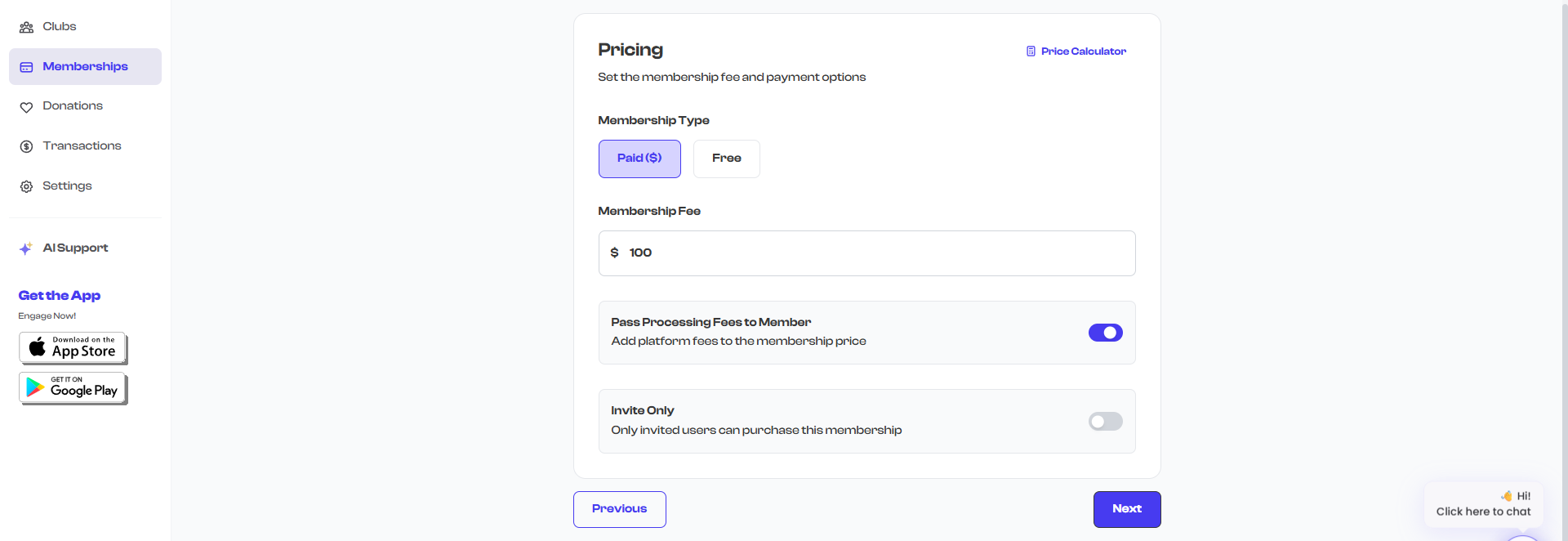
You have control over whether your organization absorbs the processing fees or passes them to the member. This is configured per membership using the Pass charges to member setting.
| Setting | What Happens | Example |
|---|---|---|
| Off (organization absorbs fees) | The member pays the base price. Your organization receives the base price minus processing fees. | Base price: $100. Member pays $100. You receive ~$96 after fees. |
| On (member pays fees) | Processing fees are added to the base price. The member pays slightly more. Your organization receives the full base price. | Base price: $100. Member pays ~$104. You receive $100. |
Most organizations pass fees to the member so they receive the exact amount they set as the membership fee. This is the industry standard approach for membership and subscription billing.
Offline / Manual Payments
Not all members will pay online. FeatsClub lets you record offline payments when you add members manually from the dashboard. Supported offline payment modes include:
| Payment Mode | Use Case |
|---|---|
| Cash | Member paid with cash at your location |
| Check | Member wrote a check |
| Venmo | Member sent payment via Venmo |
| Zelle | Member sent payment via Zelle |
| Other | Any other payment method (you can add a note describing it) |
When adding a member manually, you record the payment mode, payment date, and an optional payment reference (such as a check number or Venmo transaction ID). You can also attach photos of receipts or payment confirmations.
Offline payments are recorded for your records only -- FeatsClub does not process or verify these transactions. The member's enrollment is activated immediately when you add them manually, regardless of payment mode.
Payment Confirmation and Receipts
After a successful payment, FeatsClub records a membership receipt that includes:
- Payment gateway used (Stripe or Cashfree)
- Transaction/payment ID
- Payment amount and currency
- Payment date
- Base fee (before processing fees)
- Whether the member agreed to terms and conditions
This receipt is stored in the member's enrollment record and can be viewed by both the member and the organization administrator from the membership detail page.
Currency Support
FeatsClub supports the following currencies for membership pricing:
| Currency | Code | Symbol | Payment Processor |
|---|---|---|---|
| US Dollar | USD | $ | Stripe |
| Indian Rupee | INR | ₹ | Cashfree |
| Free | None | -- | No payment required |
You select the currency when creating or editing a membership. The currency determines which payment processor is used during checkout.
Once members have enrolled in a paid membership, changing the currency type can cause issues with existing subscriptions. If you need to change currencies, consider closing the current membership and creating a new one with the correct currency.
Refunds
Refund handling depends on your payment processor:
- Stripe -- Refunds can be processed through your Stripe dashboard. Contact the member to confirm the refund amount and process it directly in Stripe's interface.
- Cashfree -- Refunds are handled through the Cashfree merchant dashboard.
- Offline payments -- For cash or check payments, refunds are handled directly between you and the member outside of FeatsClub.
FeatsClub does not currently have a built-in refund button, but future versions may include this capability. For now, process refunds through your payment processor's dashboard and update the member's status in FeatsClub manually if needed.
Payment Profile Setup
Before you can accept paid memberships, you need to connect your payment account:
- Go to Dashboard > Settings > Payments
- Select your payment region (US/International for Stripe, or India for Cashfree)
- Follow the prompts to connect your Stripe or Cashfree account
- Once connected, your payment profile is active and you can create paid memberships
You can create and launch free memberships without setting up a payment profile. This is a great way to start building your member base while you set up your payment infrastructure.
What's Next?
Learn about Member-Only Events to see how you can create exclusive events that are accessible only to your enrolled members.